If you run a small business, you already know that sending invoices is one of those tasks that never feels exciting but always feels urgent. You finish a job and want to get paid the last thing you want to do is spend an hour formatting a document in Word or fight with a spreadsheet that breaks every time you add a new line item. “Invoice simple” solutions exist to solve exactly this problem, and that’s why so many small business owners search for a tool that lets them create and send an invoice in minutes instead of hours.
In this guide, we’ll walk through what makes invoicing truly simple, how tools like Invoice Simple work, what features actually matter, and how to pick the right option for your business. We’ll also touch on how automated data extraction technology fits into the picture for businesses that deal with a high volume of invoices, since that’s a related but different need worth understanding.
What Does “Simple Invoicing” Really Mean?
When people search for invoice simple, they’re usually not looking for something fancy. They want three things: a clean template, a fast way to fill it out, and a way to send it to a client without any friction. Simple invoicing means you can go from finishing a job to having an invoice in a client’s inbox in under five minutes, using your phone if needed, without any accounting background.
This is different from full accounting software, which often includes payroll, inventory tracking, tax filing, and dozens of other features most freelancers and small contractors never touch. A simple invoicing tool strips all of that away and focuses on one job: helping you bill your customers and get paid faster. That focus is the whole point, and it’s why apps built around this idea tend to have such loyal users among plumbers, photographers, cleaners, freelance designers, and other small service businesses.
How Invoice Simple Works
Invoice Simple is one of the most well-known names in this space, and its approach explains a lot about why simple invoicing tools have become so popular. The idea is straightforward. You pick from a large library of ready-made templates, add your logo and business details once, then fill in the client’s name, the work you did, and the amount owed. From there, you can send the invoice by email or text message, and your client can pay you online with a card, bank transfer, PayPal, or similar method right from the invoice itself.
What makes this kind of tool appealing is how little setup it needs. You don’t have to build a template from scratch or worry about formatting columns so the numbers line up correctly. You also don’t need to keep a separate file for every client, because your account saves everything and lets you reuse it. If you’ve sent a similar invoice before, you can duplicate it and just change the details, which saves a lot of time if you bill the same clients regularly.
Another part of the appeal is that this kind of app works on your phone, not just your desktop. A lot of small business owners are on the move all day, whether they’re driving between job sites or working out of a van. You can create an estimate on-site, get a digital signature to approve it, and turn it into an invoice with one tap, which saves you real time and explains why mobile-first invoicing apps have grown so much over the past few years.
Estimates, Invoices, and Getting Paid Faster
A good simple invoicing tool doesn’t stop at invoices. Many jobs start with a quote or an estimate, and being able to turn that estimate directly into an invoice once the client approves it removes a whole step of manual re-typing. This matters more than it might seem, because every time you retype numbers by hand, there’s a chance of a typo, and a wrong total on an invoice can delay payment while you sort out the confusion with your client.
You want to get paid faster, and that’s the real goal of all of this. Send a clean, professional-looking invoice right after you finish a job, and clients usually pay you sooner than if it sat half-written on your desk for a week. Adding an online payment option makes this even faster, since the client can pay the moment they open the invoice instead of having to write a check or set up a separate bank transfer later. Automatic payment reminders are another small feature that makes a real difference, because they take the awkwardness out of chasing late payments. Instead of you having to send an uncomfortable follow-up text, the software sends a polite reminder on your behalf.
Templates and Looking Professional
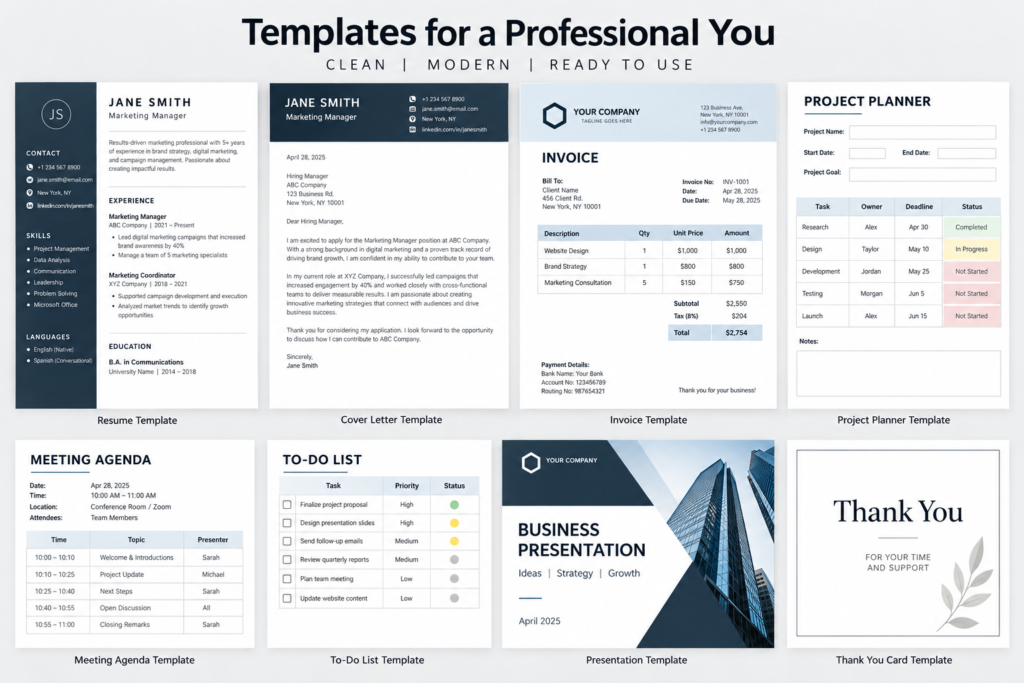
First impressions matter, even on something as small as a document. An invoice with a clear layout, your business logo, and consistent branding tells a client you run a serious operation, even if you’re a one-person business. This is one of the underrated benefits of using a dedicated invoicing tool instead of a plain Word document. You get access to dozens of professionally designed templates, and you can adjust colors and add your logo so every invoice looks like it came from your brand, not a generic template someone downloaded from the internet.
Different industries also have slightly different invoicing needs. A photographer might want space to describe a shoot package, while a contractor might need room for materials and labor listed separately. Good invoicing tools offer trade-specific templates, so you don’t have to adapt a generic layout that doesn’t quite fit your work.
Tracking Expenses Alongside Invoices
Invoicing and expenses tend to go hand in hand for small businesses. If you’re buying materials for a job or covering costs that you plan to bill back to a client, having a way to track those receipts in the same place you create invoices saves you from juggling two separate systems. Some simple invoicing apps include a basic expense tracker that lets you snap a photo of a receipt and have the details captured automatically, which then makes it easier to pull together a summary when tax season rolls around or when you need to show a client exactly what you spent on their behalf.
This kind of feature isn’t about replacing full bookkeeping software. It’s about giving small business owners just enough visibility into their spending without forcing them to learn a complicated accounting system they’ll never fully use.
Why Automation Matters as You Grow
Simple invoicing tools work beautifully when you’re creating and sending invoices yourself. But as a business grows, or if you’re on the receiving end of a large number of invoices from vendors and suppliers, a different kind of challenge shows up: how do you process incoming invoices quickly without manually typing every number into your accounting system?
This is where invoice data extraction technology, sometimes called invoice OCR, comes in. OCR stands for optical character recognition, and in simple terms, it means software that can read a scanned invoice or a PDF and automatically pull out the important details, like the vendor name, the invoice number, the date, the total amount, and the individual line items. Instead of someone on your team retyping all of that information by hand, the software reads it and drops it straight into a spreadsheet or accounting system.
Tools built around this kind of automation, such as Mindee’s invoice OCR technology, are aimed more at developers and larger companies that need to process a high volume of incoming bills, often from many different suppliers with different invoice formats. This differs from Invoice Simple, which serves businesses that mostly send invoices out rather than process a flood of incoming ones. If your business creates and sends its own invoices to clients, a simple invoicing app almost always fits better. If you’re a larger company drowning in vendor bills every month, automated data extraction is worth looking into as a separate solution, sometimes used alongside your accounting software rather than instead of it.
Choosing the Right Simple Invoicing Tool
With so many invoicing apps available, it helps to know what to actually compare rather than just picking whichever one shows up first in a search. Start by thinking about how you work day to day. If you’re often on job sites or traveling between clients, a strong mobile app matters more than a feature-packed desktop dashboard you’ll rarely open. If you bill the same handful of clients over and over, look for a tool that lets you save client details and reuse line items so you’re not retyping the same information every time.
Payment options are worth checking closely too. A tool that lets clients pay directly from the invoice, through a card, bank transfer, or a service like PayPal, tends to get you paid noticeably faster than one that only lets you generate a PDF and email it separately. Pricing is another factor, and most simple invoicing apps offer a free plan or a free trial with a cap on how many invoices you can send, which is a good way to test the interface before committing to a paid tier.
Finally, think about how much you actually need. It’s tempting to pick a tool with every feature under the sun, but for most freelancers and small service businesses, the winning combination is speed, simplicity, and reliability. The best invoicing tool is the one you’ll actually open and use every single time you finish a job, not the one with the longest feature list.
Read More: Best Rocoto Relleno Near Me: A Complete Guide to Finding the Real Deal
The Bottom Line
Invoicing doesn’t have to be complicated, and for most small businesses, it shouldn’t be. Simple invoicing tools remove the friction between finishing a job and collecting payment. Whether you’re a solo contractor sending your first invoice or a growing team managing dozens of clients, pick a tool that’s fast, mobile-friendly, and easy for clients to pay. You’ll save time every week and collect payment faster with less hassle.